Hi Community,
If you have ever tried to implement a CIS Benchmark in Microsoft Intune by hand, you already know how this goes. You open a PDF that runs to several hundred pages, scroll to recommendation 1.1.1, read the remediation section, switch to the Intune admin center, search the Settings Catalog for something that looks like the setting name, hope you picked the right one, set the value, and move on. Then you do it again. And again. Four hundred more times.
Using the CISPolicycreator tool simplifies the implementation of CIS Benchmarks in Microsoft Intune.
A few weeks later someone asks you to reconstruct what you configured and why, and you realise you cannot. Not really. You have a spreadsheet, a memory of a long week, and a nagging feeling about that one setting where two Settings Catalog entries had almost the same display name.
That is the problem CISPolicyCreator is built to help with. And with v1.1.0 the biggest gap in the project is closed: the Windows 11 v5.0.0 catalog is now complete for this tool’s documented policy-creation scope.
Please read this first
CISPolicyCreator is a free, non-commercial community project and an independent publication. It has not been authorized, sponsored, certified, endorsed, or otherwise approved by the Center for Internet Security, Inc. It is not an official CIS Build Kit, and generated policies do not by themselves establish CIS compliance.
The CISPolicycreator is an essential part of streamlining your CIS compliance efforts.
The tool is designed to help implement reviewed settings from an Intune-specific CIS Benchmark that you have obtained yourself. Everything it produces requires independent validation before production use. Your organization remains responsible for reviewing, testing, assigning, monitoring, and validating every policy.
👉 https://github.com/JoeryVandenBosch/CISPolicyCreator
What the tool does
CISPolicyCreator reads a legitimately obtained CIS Benchmark PDF that was written specifically for Microsoft Intune, and builds a policy pack from it that is validated against your own tenant’s Settings Catalog snapshot. It then exports that pack as a portable ZIP full of request-ready Intune policy JSON files.
The CISPolicycreator helps build a policy pack effectively, ensuring all requirements are met.
Three things worth knowing up front, because they are what people ask me first.
Many users find that the CISPolicycreator tool drastically reduces the time spent on compliance tasks.
No tenant login is needed to create the JSON bundle. The build runs offline against a Settings Catalog snapshot you export once. You can produce the full policy set on a workstation that never touches production.
With the CISPolicycreator, you can easily manage your organization’s security settings.
AI is not a runtime dependency. ChatGPT, Codex or any other AI service is not required and is not called when you run the tool. Everything happens in the PowerShell and Python in the repository. I want the output to be reproducible and auditable, and you cannot audit a model’s opinion about a settingDefinitionId.
Importing is optional. The repository ships a fail-closed importer for test-tenant validation, but you do not have to use it. If all you want is a folder of importable JSON that you review yourself, you stop after the build step.
The CISPolicycreator’s ease of use makes it a preferred choice for IT professionals.
One thing the tool never does is hand you the source material. The repository does not distribute CIS Benchmark PDFs, CIS Build Kits, or raw extracted benchmark prose. You obtain the correct Intune-specific PDF yourself under the applicable CIS terms, and it stays on your machine. PDFs, raw extraction data, tenant snapshots and your administrator decisions all live outside Git.
What is new in v1.1.0
At v1.0.0, Windows 11 was the embarrassing row in the table: 154 recommendations mapped and 261 unresolved. It was the oldest catalog in the project and it showed.
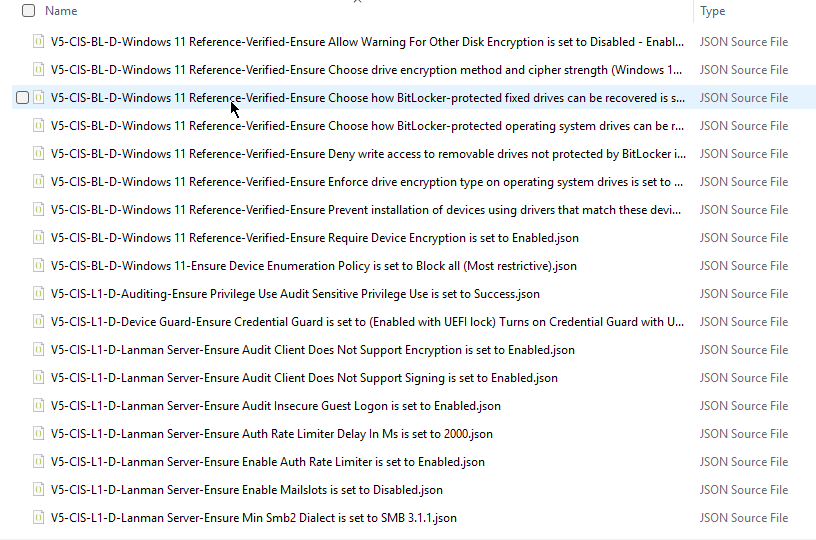
It is now finished. All 415 Windows 11 recommendations have an explicit classification: 371 mapped, 8 requiring an administrator value, 36 human or custom work, and zero unresolved. Building the pack produces 326 policy JSON files — 325 Settings Catalog policies plus one Windows compliance policy.
The part I want to be explicit about is how that was done, because the lazy version of this work would have been to copy the Windows 10 v5 catalog across and call it a day. That is not what happened. 227 Windows 10 v5 classifications were reused only where the private source extraction proved an exact match on title, remediation text and assessment method. The 34 recommendations that are genuinely Windows 11-specific were mapped independently from explicit snapshot definition and value IDs.
Along the way the required dependent settings for printers, firewall, Config Refresh and Windows Hello are now bundled properly, so every emitted policy is independently deployable without any invented companion values. Real-PDF pack and ZIP validation, offline importer preparation, and repeated-build byte reproducibility all pass.
Using the CISPolicycreator ensures that your policies are current and in line with best practices.
Since v1.1.0 shipped, every newly generated policy ZIP also carries a NOTICE.txt file containing the licensing, attribution, trademark and independence notice. The pack validator requires that notice to be present and exact. The importer recognises it as metadata and never sends it to Microsoft Graph, so it travels with the bundle without ever becoming policy content.
What the status words actually mean
The CISPolicycreator provides a clear overview of your compliance status at any time.
Before the coverage table, this needs saying, because it is the part that gets misread most often. Every recommendation in every supported benchmark lands in exactly one of four groups. These describe what the tool can safely do. They are not a score, they are not a compliance rating, and they do not mean recommendations outside Mapped are unimportant.
| Status | What it means | Creates policy JSON? |
|---|---|---|
| Mapped | The exact Intune setting and the exact required value are known and validated against the specified benchmark version. Nothing is guessed. | Yes |
| Requires input | The Intune setting is known, but the correct value depends on your organisation. The benchmark gives no universal answer — a firewall log path, a telemetry choice, a session timeout. | Yes, once you supply the value |
| Manual | The recommendation needs a person, a documented process, or custom work that cannot honestly be represented as a normal Intune policy. | No |
| Unresolved | A safe, complete Intune implementation has not been proven. It is tracked, but there is not enough evidence or the required companion settings are missing. | No |
Manual and Unresolved are not the same thing, and conflating them hides real information. Manual means we know the recommendation belongs in a human or process workflow. Unresolved means an automated implementation may well be possible, but this project cannot yet produce it safely and completely. One is a deliberate destination; the other is honest unfinished business.
One more terminology note. CIS separately labels how a recommendation is assessed, as Automated or Manual. That is a different axis and it belongs to the benchmark, not to this project. A recommendation the benchmark says must be checked manually can still be Mapped here, when the exact Intune configuration is known. The table below reports this project’s own implementation status. It is not a CIS assessment result and it is not an assessment of your tenant.
The CISPolicycreator tool empowers teams to maintain rigorous security compliance.
Current coverage
Understanding how to leverage the CISPolicycreator is key to efficient policy management.
For every row, Mapped plus Requires input plus Manual plus Unresolved equals the total number of recommendations reviewed in that benchmark version. Nothing is quietly dropped.
| Benchmark (Intune-specific PDF) | Version | Mapped | Requires input | Manual | Unresolved | JSON files |
|---|---|---|---|---|---|---|
| Microsoft Intune for Windows 11 | 5.0.0 | 371 | 8 | 36 | 0 | 326 |
| Microsoft Intune for Windows 10 | 5.0.0 | 312 | 5 | 41 | 0 | 278 |
| Microsoft Intune for Office | 1.1.0 | 238 | 0 | 0 | 0 | 234 |
| Microsoft Intune for Edge | 1.0.0 | 135 | 3 | 0 | 0 | 138 |
| Apple macOS 26 Tahoe Intune | 1.0.0 | 84 | 14 | 1 | 1 | 82 |
| Apple iOS 26 and iPadOS 26 Intune | 1.0.0 | 84 | 8 | 1 | 1 | 60 |
| Total | 1,224 | 38 | 79 | 2 | 1,118 |
That is 1,343 recommendations reviewed across six benchmark versions, with two deliberately left unresolved.
Utilizing the CISPolicycreator enables clear documentation of compliance efforts.
The JSON file count is often lower than the mapped count, and that is expected rather than a bug. Manual and unresolved recommendations produce no JSON at all, duplicate rows can share one implementation, and settings that depend on each other get bundled into a single policy so the result is actually deployable.
Worth stating plainly: zero unresolved means complete for this tool’s documented policy-creation scope. It does not mean every recommendation becomes a policy, and it certainly does not mean a tenant built from these files is compliant with anything. It means every recommendation has been deliberately classified as mapped, waiting on an administrator choice, or needing human work.
Every interaction with the CISPolicycreator strengthens your security framework.
The two remaining unresolved recommendations
Both are Locked enrollment: iOS/iPadOS recommendation 3.10.1 and macOS recommendation 2.13.1.
In each case the relevant Intune setting is known. The problem is that Microsoft requires a complete ADE enrollment profile, and several of the companion settings are organisation-specific enrollment and Setup Assistant choices that the benchmark does not prescribe and that have no safe default.
So the tool emits nothing. It does not invent the missing values, and it does not ship JSON that Intune would reject. It also does not quietly relabel these as human-only controls to make the unresolved column read zero. They stay visible, in the honest column, until they can be done properly.
The CISPolicycreator supports organizations in achieving comprehensive security compliance.
The design principle: fail closed
It would be very easy to write a tool that reaches 100% coverage by guessing. Take the recommendation title, fuzzy-match it against Settings Catalog display names, pick the best candidate, emit JSON. It would demo beautifully. It would also silently put the wrong setting in your tenant, and you would have no way of knowing which ones.
CISPolicyCreator optimises for accuracy and auditability instead of maximum automation. When any source identity, mapping, value, administrator decision or cross-file reference is uncertain, the affected implementation is simply not emitted. Concretely, the tool will never:
-
- construct, derive or guess a Microsoft Graph settingDefinitionId;
- guess or heuristically select a choice or value ID;
- use a display-name match to make a deployment decision;
Documentation generated by the CISPolicycreator enhances transparency.
-
- invent an organisational value;
- emit fake JSON for a control that is really a human process;
- create assignments;
- upload or commit your CIS PDF;
- overwrite a different Intune policy that happens to share a name.
Take advantage of the CISPolicycreator to verify your compliance status quickly.
Every recommendation stays visible in the inventory whatever its status. A reviewer can trace any deployable policy back to its recommendation ID, profile, assessment method, status, exact Graph definition and value, and the administrator decision behind it where one applies. Builds are deterministic: identical input bytes produce identical pack bytes, with no build timestamp baked in.
Before you start
You will need a Windows machine with PowerShell 7 (not Windows PowerShell 5.1), Git for Windows, and Python 3.11 or later. You also need an Intune tenant, an account that can read and create device configuration policies, and the correct CIS Benchmark PDFs, obtained legitimately under the applicable CIS terms.
That last point matters more than it sounds. The PDFs must be the ones written for Microsoft Intune. A generic Microsoft Edge, Office, Apple, Android, Chrome or Safari benchmark is not a substitute, and the tool rejects it during the source eligibility check. That is deliberate: the project should never infer that a GPO or Apple Configurator recommendation is equivalent to a specific Intune object. Get the PDFs from the official CIS Microsoft Intune page or the CIS Intune for Apple page, keep them in your private folder, and never commit or publish them.
The CISPolicycreator is indispensable for maintaining control over security settings.
The walkthrough
The README has the full beginner version in fifteen steps. Here is the condensed path. Open PowerShell 7 for all of it.
1. Clone and initialise
New-Item -ItemType Directory -Path C:\Tools -Force
Set-Location C:\Tools
git clone https://github.com/JoeryVandenBosch/CISPolicyCreator.git
Set-Location C:\Tools\CISPolicyCreator

.\scripts\Initialize-CISPolicyCreator.ps1 -IncludeGraph
.\scripts\Test-CISPrerequisites.ps1 -RequireGraph
Transitioning to the CISPolicycreator can significantly reduce compliance burdens.
This creates repository-local .venv and .modules folders with the exact pinned versions of the PDF parser and the Graph authentication module. The versions are hash-locked on purpose: if the parser version drifts, extraction stops before the PDF is even read. Already cloned from an earlier version? Just run git pull.
2. Create your private working folders
New-Item -ItemType Directory -Path .\private\pdf -Force
New-Item -ItemType Directory -Path .\private\graph -Force
New-Item -ItemType Directory -Path .\work\packs -Force
Both private and work are ignored by Git. Drop your CIS PDFs into private\pdf. Nothing in these folders is ever committed, published, or included in a generated pack.
3. Export your current Settings Catalog
$TenantId = '00000000-0000-0000-0000-000000000000'

.\scripts\Export-SettingsCatalogDiagnostics.ps1 `
  -TenantId $TenantId `
  -UseDeviceCode `
  -OutputPath .\private\graph\settings-catalog-snapshot.json
With the CISPolicycreator, security compliance becomes an achievable goal.
You sign in with a device code, then wait. Downloading the complete Settings Catalog takes several minutes and you will see progress messages counting up through thousands of definitions. That is normal, leave it running until it reports the file it wrote.
This snapshot is your own private tenant evidence. It is what the tool uses to confirm that every mapped setting and every option still exists in your environment. It stays outside Git, and it is never silently replaced, so if the output file already exists you must give the new export a different filename.
4. Answer the administrator questions
Some benchmark settings do not prescribe one universal value. A minimum OS version or a login-window message is your organisation’s call, not mine and not the tool’s. Those recommendations sit in the Requires input group until you answer them. One wrinkle worth knowing: a single recommendation can need more than one value, so the number of answer fields in the decision file can be higher than the number of recommendations. Windows 11 has eight recommendations needing input, but one of them takes two values, which makes nine answer fields.
Ensure your compliance journey includes the CISPolicycreator as a key resource.
| Selector | Recommendations needing input | Answer fields |
|---|---|---|
| Windows11-5.0.0 | 8 | 9 |
| Windows10-5.0.0 | 5 | 6 |
| Office-1.1.0 | 0 | 0 |
| Edge-1.0.0 | 3 | 3 |
| macOS26-Tahoe-1.0.0 | 14 | 15 |
| iOS26-iPadOS26-1.0.0 | 8 | 8 |
.\scripts\New-CISAdministratorDecisions.ps1 `
  -MappingCatalogPath $CatalogPath `
  -OutputPath $DecisionPath

notepad $DecisionPath
For each question you enter an allowed value, flip acknowledged to true, and add a short justification. That justification is not busywork. It is your own record of the one part of the baseline a machine genuinely cannot decide for you. Keep the file private and never commit it.
5. Build the pack and the ZIP
Investing time in learning the CISPolicycreator can lead to substantial long-term gains.
$Benchmark = 'Windows11-5.0.0'
$RunId = Get-Date -Format 'yyyyMMdd-HHmmss'
$PackPath = ".\work\packs\windows11-v5-$RunId"
$BundlePath = ".\work\$Benchmark-policies.zip"

$BuildArguments = @{
  Benchmark                   = $Benchmark
  PdfPath                     = '.\private\pdf\CIS_Microsoft_Intune_for_Windows_11_Benchmark_v5.0.0.pdf'
  SettingsCatalogSnapshotPath = '.\private\graph\settings-catalog-snapshot.json'
  OutputPath                  = $PackPath
  PolicyJsonBundlePath        = $BundlePath
  PolicyJsonBundleName        = "$Benchmark-policies"
  Profile                     = 'ALL'
}

if ($DecisionPath) {
  $BuildArguments.AdministratorDecisionsPath = $DecisionPath
}

.\scripts\Build-CISSupportedBenchmark.ps1 @BuildArguments
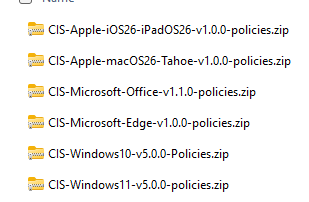
In one command this verifies the PDF title and version, extracts the recommendations locally, validates every mapping against your snapshot, generates the unassigned policy JSON, validates the pack and the ZIP, and then deletes the temporary raw extraction. Output paths are never overwritten, so rebuilds need a new folder and filename.
6. Inspect what you got
Effective use of the CISPolicycreator can streamline your organization’s compliance processes.
.\scripts\Test-CISPolicyPack.ps1 -PackRoot $PackPath
.\scripts\Get-CISMappingReport.ps1 -PackRoot $PackPath
.\scripts\Test-CISWindowsStylePolicyBundle.ps1 -BundlePath $BundlePath
The mapping report is your own record of what the tool did and did not implement — which recommendations are mapped, which needed your input, which are human work and which remain unresolved. It is a build record, not a compliance attestation, and it does not demonstrate consistency with a benchmark. That determination is yours to make, with your own testing and your own auditors.
Inside the ZIP you get SettingsCatalog\*.json with importable Settings Catalog policies, plus DeviceConfigurations\*.json, CompliancePolicies\*.json or GraphObjects\*.json where a setting needs a different typed Intune API, and NOTICE.txt carrying the licensing and independence notice. What you will not find in there: your CIS PDF, raw benchmark prose, credentials, assignments, tenant IDs, or any AI artefacts. Repeating the same export with the same pack, snapshot and profile produces the same ZIP bytes.
If importable JSON is all you wanted, you are finished here.
The optional import path
If you do want the tool to create the policies for you, it is a deliberate three-gate process. Validate offline, dry run, then write.
With the CISPolicycreator, keeping pace with compliance is manageable.
# Gate 1: offline, no sign-in
.\scripts\Import-CISWindowsStylePolicyBundle.ps1 -BundlePath $BundlePath -ValidateOnly

# Gate 2: read-only live check
.\scripts\Import-CISWindowsStylePolicyBundle.ps1 `
  -BundlePath $BundlePath -TenantId $TenantId -UseDeviceCode -DryRun

# Gate 3: actually create, unassigned
.\scripts\Import-CISWindowsStylePolicyBundle.ps1 `
  -BundlePath $BundlePath -TenantId $TenantId -UseDeviceCode -ConfirmUnassignedImport
The importer validates the entire ZIP before it authenticates, then validates every live Graph definition and value before its first write, including every required companion setting and template reference. If a policy already exists with the same name it reads that policy in full and compares it; an exact match is left untouched, and anything different aborts the run rather than assuming the two are equivalent. Creation stops on the first Graph error unless you explicitly add -ContinueOnError.
For the iOS/iPadOS bundle there is one extra wrinkle. It contains 58 assignable policy objects plus two tenant-wide Intune settings, and those two are not assignable policies. For the safest policy-only import add -SkipTenantWideSettings. To apply them instead, review them first and add -ConfirmTenantWideSettingsUpdate. The importer refuses to choose between those two options on your behalf.
Then check your work in the admin center under Devices → Configuration. Policies generated from the v5 Windows benchmark versions are named with a V5-CIS- prefix, and other benchmark versions follow the same V-major-CIS convention, so they are easy to filter. Open one, verify the settings, and leave everything unassigned until your organisation has reviewed and tested it.
Empower your compliance team with the capabilities of the CISPolicycreator.
Be clear about what importing does and does not do. Every generated policy JSON is unassigned. Importing creates policy objects in your tenant; it does not deploy anything to users or devices, and it does not change the security state of a single endpoint. Assignment, monitoring and production rollout are separate administrator actions that the tool has no ability to perform. It contains no assignment operation at all and never selects users, devices or groups. That is a design decision, not a limitation I plan to remove.
Licensing, independence and what this project is not
CISPolicyCreator is published without charge for non-commercial community use. It is an independent publication and has not been authorized, sponsored, certified, endorsed, or otherwise approved by the Center for Internet Security, Inc. It is not an official CIS Build Kit and should never be described as one. CIS is not a partner in this project.
The licensing is split. The original software and general repository documentation are licensed under MIT. To the extent that the project contributors hold applicable copyright or similar rights, their original contributions under the benchmarks directory are offered under CC BY-NC-SA 4.0. That split is a good-faith risk-reduction measure, not a legal conclusion. It cannot grant rights owned by CIS, and it does not override the additional restrictions in the CIS Terms of Use.
Fostering a culture of compliance is easier with the CISPolicycreator at your disposal.
It is also worth being straight about an unresolved tension. The CIS non-member terms reference CC BY-NC-SA 4.0 for Benchmark PDFs while also listing additional restrictions, including language concerning direct derivative works. I am not claiming this project has definitively resolved that ambiguity, because it has not. If you intend to redistribute anything derived from this project publicly, or to use it commercially, get written clarification from CIS or advice from qualified legal counsel first. The LICENSING.md file in the repository sets out the full reasoning.
References worth reading yourself:
Engage your staff with training on the CISPolicycreator for effective policy management.
CIS, CIS Benchmarks and CIS SecureSuite are trademarks or service marks of the Center for Internet Security, Inc. Microsoft, Microsoft Intune, Microsoft Entra and Microsoft Graph are trademarks of the Microsoft group of companies. References to those products identify the external source standard and the target platform only.
Give it a go
Start with the beginner instructions in the README; they are written step by step and assume nothing. The common stumbles are covered there too. A source eligibility failure almost always means the wrong PDF or the wrong selector. A runtime mapping validation failure means Microsoft changed a definition since your snapshot, in which case you export a fresh snapshot rather than editing JSON by hand.
A short reminder before you go, because it matters more than any feature in this post. This is an independent, free, non-commercial community project with no CIS authorization, sponsorship, certification or endorsement. It is not an official CIS Build Kit. Generated policies are designed to help implement reviewed settings from an Intune-specific CIS Benchmark, mapped against the specified benchmark version — they do not by themselves prove compliance or a particular level of consistency with any benchmark. Everything requires independent validation before production use, and every policy arrives unassigned until you decide otherwise.
Feedback, issues and feature requests are very welcome. If you run it against a benchmark I have not covered yet, or you think one of the mappings is wrong, open an issue on GitHub. I would much rather hear about it than not.
👉 CISPolicyCreator v1.1.0 on GitHub
Enjoy!